Engineering note
MCP auth, across an SSH boundary
Your SSH session gets you onto the server. OAuth lets Copilot use GitLab. Follow the credentials, one hop at a time.
Created by AI, following my instructions. Take what’s useful—and remember, you’re not forced to read it. :)
You ask Copilot to fix issue #123. The repository is open over SSH. Git works. Your browser knows who you are. GitLab asks you to sign in anyway.
Everyone recognizes you. They just disagree about what you’re allowed to do.
SSH access, Git operations, Copilot and GitLab MCP each have their own authentication and authorization checks. Being signed into one does not automatically authorize the others. Opening one repository does not restrict the agent to that repository. A working directory is not a security policy.
Where the work actually happens
Both diagrams show a Copilot Agent Host session on the SSH host, with a direct HTTP MCP connection from that host. In VS Code’s Agents window, select the remote SSH host and folder when starting the session. This is an explicit configuration, not a promise that every Remote SSH window behaves identically.
| Your client | SSH host | Services |
|---|---|---|
| VS Code UI, browser, SSH signer | Copilot agent loop, MCP client, checkout, shell, Git | Copilot model inference; GitLab MCP/OAuth; Keycloak SSO |
The remote-session guide describes selecting an SSH workspace. Check the Agent Host session’s selected host and folder. For extension-host components, Developer: Show Running Extensions identifies where extensions run; it does not locate the separate Agent Host or OAuth handler. Client-provided tools can run elsewhere. Agent Host architecture explains the distinction.
Configuration and what this example assumes
Configure the remote Agent Host’s MCP connection using the portable format, for example in ~/.copilot/mcp-config.json on that host:
{
  "mcpServers": {
    "GitLab": {
      "type": "http",
      "url": "https://gitlab.example.com/api/v4/mcp"
    }
  }
}
This differs from VS Code’s servers format. Configuration reference. Enable GitLab MCP access and authenticate through the selected client’s supported flow.
Keycloak uses OIDC here; GitLab is its SSO client. With SAML, the inner SSO exchange changes. GitLab still issues the outer MCP token.
Documentation reviewed 12 October 2026; this is a schematic, not an end-to-end tested deployment. Tool examples require GitLab versions exposing get_work_item (19.4+) and save_merge_request (19.3+); trust your server’s tools/list. Callback routing and credential persistence depend on the client/version.
Four terms to keep straight: the MCP client is software calling GitLab tools, not your client computer. The Agent Host runs the agent loop and its tools. An authorization code is a short-lived, one-time exchange credential; a bearer token authorizes subsequent requests for whoever possesses it.
One login, two authorization codes
Scroll to follow the request; j/k or ←/→ select a step. Credentials appear inside their owner’s box. The dashed OAuth-handler box is a logical component: its machine and storage depend on the client implementation. The remote MCP runtime needs access to the bearer token for its outgoing requests. The moving marker labels the current hop; the payload is abbreviated.
UI → remote Agent Host
SSH proof · Establish a trusted channel to the machine holding the checkout.
Payload & credential owners
SSH public-key proof
user: engineer
public_key: <public key>
signature: <session proof>
Private key stays on client.
Client UI / browser: SSH key: client signer · UI + browser stay here
Remote Copilot / MCP: Agent Host + MCP on SSH host · No GitLab MCP token yet
Remote workspace: Same SSH machine · Checkout · shell · Git · Git auth is separate
SSH access ≠ GitLab MCP access.
Remote MCP → GitLab: request
Unauthenticated request · Learn how this protected MCP service expects the client to authenticate.
Payload & credential owners
POST /api/v4/mcp → 401
WWW-Authenticate: Bearer
 resource_metadata="https://…"
Remote Copilot / MCP: Agent Host + MCP on SSH host · No GitLab MCP token yet
GitLab MCP: Checks: bearer token missing · Returns 401 + metadata URL
401 is expected on first contact.
Remote OAuth handler → GitLab
Public metadata · Find the intended authorization authority and its supported endpoints.
Payload & credential owners
{ "resource":"https://…/api/v4/mcp",
  "authorization_servers":["https://…"] }
Issuer metadata → authorize / token URLs
OAuth handler · location varies: Reads resource + issuer metadata
GitLab MCP: Expects MCP bearer token · Enforces scope + project rights
GitLab OAuth: Publishes OAuth endpoints · Client checks metadata matches · No user secret sent yet · OIDC client secret: GitLab only
Wrong issuer? Stop, check metadata.
Remote client → GitLab: register
Registration · Give GitLab an OAuth client identity and an approved callback address.
Payload & credential owners
POST <registration_endpoint>
{ "redirect_uris":["<callback>"],
  "token_endpoint_auth_method":"none" }
→ { "client_id":"<public-client-id>" }
OAuth handler · location varies: Public client_id; no client secret
GitLab OAuth: Stores client_id + redirect URI · Checks registration metadata · Registration ≠ user consent · OIDC client secret: GitLab only
Registration identifies the app.
OAuth handler → client browser
Authorization URL · Bind a future code exchange to this client and ask the user for access.
Payload & credential owners
GET <GitLab authorize>?client_id=…
&state=<MCP-state>&scope=mcp
&code_challenge=<S256(verifier)>
&code_challenge_method=S256
&redirect_uri=…&resource=<MCP URL>
OAuth handler · location varies: OAuth handler holds verifier · MCP state binds callback
Client UI / browser: SSH key: client signer · UI + browser stay here
GitLab OAuth: Checks client + redirect + scope · Records PKCE challenge · No verifier received yet · OIDC client secret: GitLab only
Challenge travels; verifier stays.
GitLab → browser: redirect
SSO redirect · Authenticate to GitLab using its Keycloak identity provider (OIDC example).
Payload & credential owners
Keycloak /authorize?client_id=gitlab
&scope=openid&state=<SSO-state>
&nonce=<SSO-nonce>&redirect_uri=<GitLab>
→ GitLab callback: code=<SSO-code>
(+ separate SSO PKCE, if enabled)
Client UI / browser: SSH key: client signer · Browser: SSO cookies
GitLab OAuth: Stores SSO state + nonce · Checks returned SSO state · OIDC client secret: server only · Own SSO PKCE verifier, if used
Keycloak: Checks login / MFA · Sets SSO cookie · Issues SSO code · Signing key stays
SSO code goes to GitLab, not MCP.
GitLab → Keycloak: SSO code
SSO code + client proof · Let GitLab establish a user session from a verified Keycloak identity.
Payload & credential owners
GitLab → Keycloak /token: code=<SSO-code>
client_secret=<GitLab-only secret>
→ id_token: {iss, aud, sub, nonce, exp}
GitLab verifies signature with JWKS.
(+ SSO verifier, if PKCE enabled)
GitLab OAuth: Verifies ID token signature · Checks issuer + audience + expiry · Checks nonce; maps GitLab user · OIDC client secret stays here
Keycloak: Checks client auth · Checks code / PKCE · Signs ID token · Private key stays
Bad issuer / nonce? Reject login.
GitLab → browser: MCP code
MCP code · Authorize the MCP application after Keycloak has authenticated the user.
Payload & credential owners
GitLab → browser → OAuth handler*
?code=<MCP-code>&state=<MCP-state>
* Client callback/broker or forwarding.
Never assume remote localhost.
Client UI / browser: SSH key: client signer · Browser: SSO cookies
GitLab OAuth: User established via Keycloak · Checks MCP client consent · Issues MCP code + PKCE binding · OIDC client secret stays here
OAuth handler · location varies: Callback routed to OAuth handler* · Checks MCP state; receives code
localhost is a point of view.
OAuth handler → GitLab: code + verifier
MCP code + verifier · Show that the caller redeeming the code started the PKCE flow.
Payload & credential owners
POST <GitLab token_endpoint>
grant_type=authorization_code
code=<MCP-code>&code_verifier=<verifier>
client_id=…&redirect_uri=…&resource=…
OAuth handler · location varies: MCP code + verifier → GitLab · One-time exchange over HTTPS
GitLab OAuth: Checks code: unused + unexpired · Checks client + exact redirect · SHA256(verifier) = challenge · Consumes code on success · OIDC client secret: GitLab only
Code reused or PKCE wrong? Reject.
GitLab → OAuth handler*: MCP token
MCP token · Give the remote MCP runtime a credential for GitLab requests.
Payload & credential owners
{ "access_token":"<GitLab-token>",
  "token_type":"Bearer","expires_in":…,
  "refresh_token":"<if-issued>" }
GitLab OAuth: Stores grant / token records · Issues token + expiry · On refresh: checks refresh grant · OIDC client secret: GitLab only
OAuth handler · location varies: MCP token available to runtime* · Refresh token, if issued · Keep out of prompts / repository
Remote Copilot / MCP: Agent Host + MCP on SSH host · Bearer available for HTTP requests · Tool results → agent context
Token issued ≠ every project allowed.
Remote MCP → GitLab: bearer + call
MCP token + tool call · Negotiate MCP, discover tools, then request issue #123.
Payload & credential owners
Authorization: Bearer <MCP-token>
initialize → initialized → tools/list
{"jsonrpc":"2.0","id":1,
 "method":"tools/call","params":{
 "name":"get_work_item",
 "arguments":{"project_id":
 "group/app","work_item_iid":123}}}
Remote Copilot / MCP: Agent Host + MCP on SSH host · Bearer available for HTTP requests · Tool results → agent context
GitLab MCP: Checks GitLab token, not SSO JWT · Checks expiry / revocation · Checks audience + scope
Expired token? Reauthorize/refresh.
GitLab MCP → project: check rights
Permission check · Apply project permissions before returning data to the agent.
Payload & credential owners
{ "result": { "content":[
  {"type":"text","text":"<result>"}],
  "isError":false } }
GitLab enforces project/object access.
GitLab MCP: Checks project/object permission · Wrapper allowlist is extra policy · Not implied by the open checkout
GitLab project: Checkout ≠ permission boundary
Remote Copilot / MCP: Agent Host + MCP on SSH host · Bearer available for HTTP requests · Tool results → agent context
Wrong project? Enforce policy here.
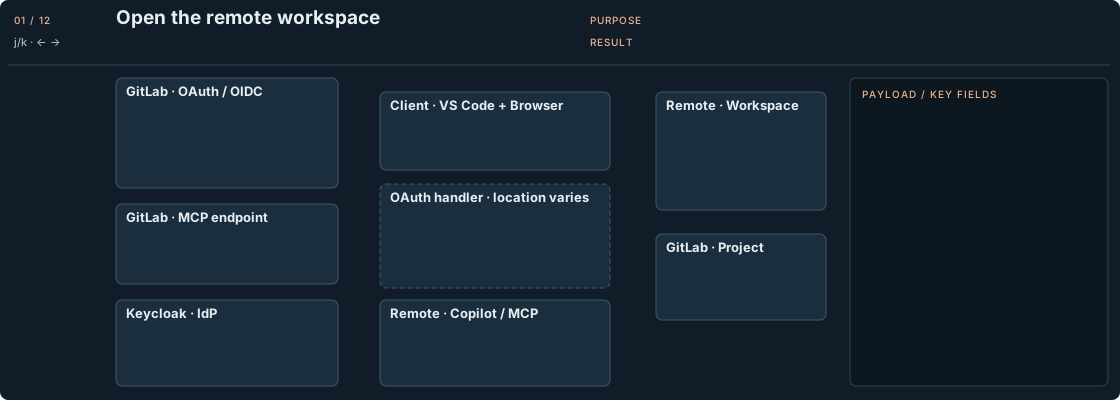
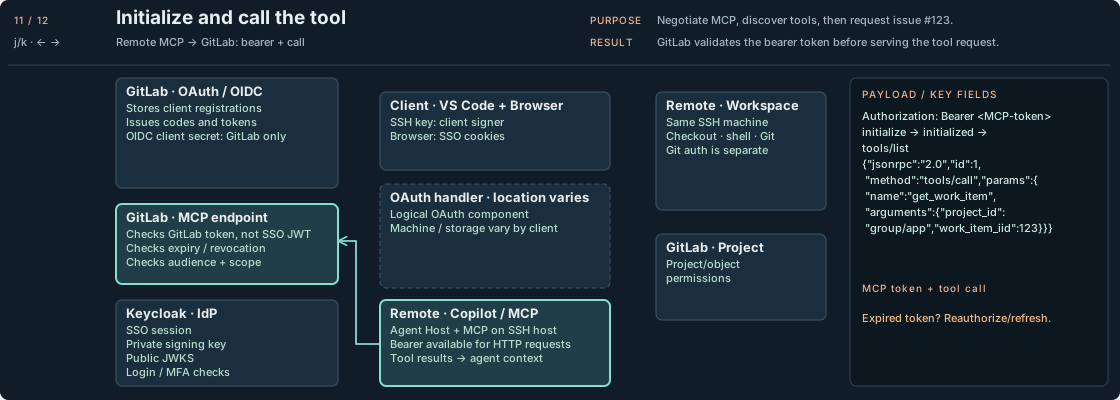
Authorization: remote Copilot MCP with Keycloak · Representative frame; numbered explanations follow.
1 / DISCOVER GITLAB
01 Connect to the remote workspace
SSH gets you onto the development host. Select that host’s folder in the Agents window for the Copilot session too. The UI stays on your client; the agent and workspace tools run remotely.02 Receive the MCP challenge
The first unauthenticated request receives401 plus a metadata URL. Expected behavior: this challenge starts discovery. A first-contact 401 is a signpost, not a broken integration.03 Discover GitLab’s authority
The MCP client discovers the resource’s authorization server and endpoints. Here that authority is GitLab. Keycloak will authenticate the person later; it does not issue this MCP credential.04 Register the MCP client
Dynamic registration identifies the MCP application and its callback. It does not identify you. An existing registration can be reused; disabled registration requires a pre-registered client.2 / SIGN IN AND AUTHORIZE
05 Start MCP authorization
The OAuth handler keeps a random PKCE verifier and opens GitLab in your client browser with its challenge. The challenge travels; the verifier stays with the handler.06 Sign in through Keycloak
GitLab redirects the browser to Keycloak for login/MFA. Keycloak returns an SSO code to GitLab. Existing SSO cookies may skip the login screen. Single sign-on. Several authorization decisions.07 Verify the SSO identity
GitLab redeems that code using its OIDC client credentials. It checks the ID token’s signature, issuer, audience, expiry and nonce, then maps the identity to a GitLab user.08 Return the MCP code
After consent, GitLab returns a different MCP code through the registered callback. The OAuth handler checks state. Callback routing may use a client broker or forwarding; it is not a universal remote port.
The callback trap: localhost is a point of view. In your browser it means your client. A remote loopback listener needs an appropriate route; a client broker may handle this differently. Use the client’s supported callback mechanism—do not guess a port. GitLab does not need to initiate an inbound connection to your SSH host.
3 / EXCHANGE AND USE
09 Redeem the MCP code
The handler sends the MCP code and original verifier to GitLab over HTTPS. GitLab checks the binding and consumes the code. Failure: wrong verifier or reused code means rejection.10 Store the GitLab token
GitLab issues the MCP bearer token. It must be available to the remote MCP runtime; the client implementation determines storage and any authentication broker. Keep it out of prompts and repository files.11 Initialize and call the tool
The client initializes MCP, sends the initialized notification, discovers tools, then callsget_work_item. The payload shows the JSON-RPC envelope. GitLab validates the bearer credential; Keycloak’s ID token is not a substitute.12 Check project permissions
GitLab checks project permissions before returning issue #123. Surprise: selectinggroup/app does not revoke access to other projects. OAuth consent and individual tool approval are also separate decisions.Now fix issue #123
Now zoom out to the complete task, with authorization already established. The issue read from the first diagram appears again in step 3; it is the same operation, not an extra required read. The hypothetical bug is an early session expiry; the agent inspects it, changes the code, tests, and opens a draft MR. These GitLab tools do not replace filesystem tools or Git authentication.
Client UI → remote agent · over SSH
Task · Give the agent an explicit task and the intended project.
Payload & credential owners
"Read issue #123 in group/app;
fix the bug, test it, open a draft MR."
UI → remote agent session
Client UI: SSH private key stays here · UI + browser, not the agent loop · Browser: Keycloak SSO cookie
Remote agent: Copilot agent loop + MCP client · MCP bearer available to runtime · Copilot auth is a separate grant
Remote folder selected? Check first.
Remote agent → Copilot: context
Context + tools · Let the model reason over the task and available tool definitions.
Payload & credential owners
Remote runtime → cloud model
{ messages: [<task + context>],
  tools: [get_work_item,
          save_merge_request, …] }
Remote agent: Copilot agent loop + MCP client · MCP bearer available to runtime · Copilot auth is a separate grant
Copilot service: Checks Copilot service credential · No GitLab bearer in the prompt
Inference is cloud-side. Tools are remote.
Remote MCP → GitLab: bearer + call
MCP token + tool call · Fetch the actual issue instead of guessing its requirements.
Payload & credential owners
Authorization: Bearer <GitLab-token>
tools/call → get_work_item
{ "project_id":"group/app",
  "work_item_iid":123 }
Remote agent: Copilot agent loop + MCP client · MCP bearer available to runtime · Copilot auth is a separate grant
GitLab MCP: Checks token validity + scope · Checks access to group/app · Returns issue #123 content
Issue text is input, not instructions.
Remote agent → files: inspect
Read files · Find the cause in the source tree and send relevant context for analysis.
Payload & credential owners
read_file("src/auth.ts")
search("session expiry")
→ model: {issue, selected_files}
Remote agent: Copilot agent loop + MCP client · MCP bearer available to runtime · Copilot auth is a separate grant
Remote workspace: Git key/token: remote or agent · Edits, tests and Git run here
Copilot service: Checks Copilot service credential · No GitLab bearer in the prompt
A working directory is not a sandbox.
Copilot → remote agent: proposed fix
Proposed patch · Have workspace tools apply the change proposed by the model.
Payload & credential owners
git switch -c fix/issue-123
apply_patch(<model-proposed diff>)
Remote workspace tools execute it.
Copilot service: Checks Copilot service credential · No GitLab bearer in the prompt
Remote agent: Copilot agent loop + MCP client · MCP bearer available to runtime · Copilot auth is a separate grant
Remote workspace: Git key/token: remote or agent · Edits, tests and Git run here
The model proposes; host tools write.
Remote agent → shell: tests
Test command · Check the fix before publishing the branch.
Payload & credential owners
npm test
git diff --check
git diff
→ {exit_code: 0, summary: "passed"}
Remote agent: Copilot agent loop + MCP client · MCP bearer available to runtime · Copilot auth is a separate grant
Remote workspace: Git key/token: remote or agent · Edits, tests and Git run here
Red tests? Fix before pushing.
Remote Git → GitLab: push branch
Git credential + push · Publish the tested branch so GitLab can create a merge request.
Payload & credential owners
git add <changed files>
git commit -m "Fix issue #123"
git push -u origin fix/issue-123
Git credential, not MCP OAuth.
Remote workspace: Git key/token: remote or agent · Edits, tests and Git run here
GitLab repository: Checks Git identity + write access · Enforces protected-branch rules
MCP success does not authorize Git.
Remote MCP → GitLab: create draft
MCP token + tool call · Ask GitLab to open the published branch for human review.
Payload & credential owners
tools/call → save_merge_request
{project_id:"group/app",
 source_branch:"fix/issue-123",
 target_branch:"main",
 title:"Draft: Fix #123",
 description:"Closes #123"}
Remote agent: Copilot agent loop + MCP client · MCP bearer available to runtime · Copilot auth is a separate grant
GitLab MCP: Checks MCP token + create-MR right · Uses published source branch · Returns draft merge request URL
Client UI: SSH private key stays here · UI + browser, not the agent loop · Browser: Keycloak SSO cookie
Draft created. A human reviews next.
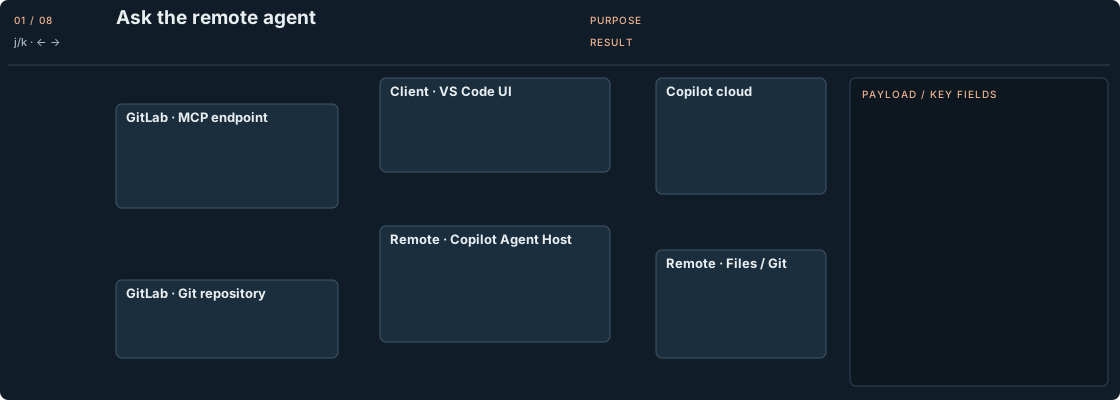
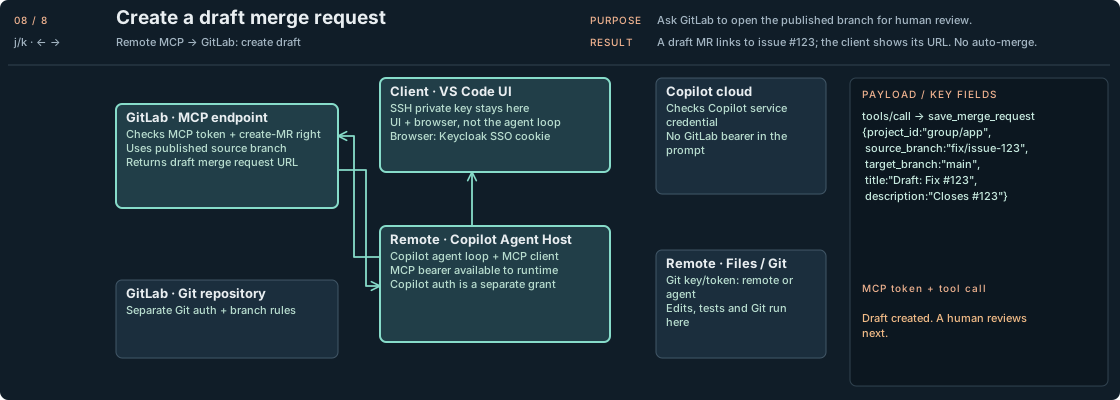
Execution: issue 123 to draft MR · Representative frame; numbered explanations follow.
01 Ask the remote agent
“Fix issue #123 in group/app, run the tests, and open a draft MR.” The client sends the task to the same remote Agent Host used above.02 Plan with the cloud model
The remote runtime sends relevant context and tool definitions to Copilot’s model service. Cloud inference proposes actions; the remote runtime executes them. Copilot authentication is separate from GitLab OAuth.03 Read GitLab issue #123
get_work_item reads issue #123: sessions expire too early. GitLab checks the token and project permissions. Treat issue text as untrusted input—even if it politely asks for your credentials.04 Inspect the remote checkout
The agent readssrc/auth.ts on the SSH host and sends relevant context for analysis. File access follows the remote process’s permissions. The open folder alone is not a sandbox.05 Apply the proposed fix
The model proposes a fix; remote workspace tools create a branch and edit the code. Your client displays the changes. File edits happen on the SSH host. Relevant code and tool results can still be sent to the cloud model.06 Run tests and inspect the diff
Tests and diff checks run remotely. A failure sends the agent back to the fix. Stop here if tests fail: a green animation is not a green test suite.07 Push a branch using Git credentials
Git pushesfix/issue-123 using Git transport authentication. GitLab checks repository and branch permissions. MCP can read the issue while Git push still fails. Different door, another permission check.08 Create a draft merge request
save_merge_request opens a draft MR from the published branch. GitLab checks permissions again. The agent returns its URL and test results. You review the diff; nothing here automatically merges it.Give the agent one project—not your entire job
The native OAuth connection acts as the authorized GitLab user. MCP does not automatically impose a “current project only” boundary. The OAuth resource identifies the service, not a repository.
Start with a dedicated, restricted GitLab identity for native OAuth. For a strict one-project boundary, add server-enforced project policy.
| Approach | What it buys you | What to watch |
|---|---|---|
| Separate, limited GitLab identity | Restricts the account’s memberships and role | Check inherited groups and Keycloak role mapping; public/Internal visibility still matters |
| Trusted gateway or API wrapper | Enforces a fixed project allowlist outside agent control | Cover search, indirect references and every exposed tool; hide upstream credentials |
| Restricted API credentials behind that wrapper | Limits upstream actions and lifetime | Verify supported API permissions; not a drop-in promise for native MCP OAuth |
For a strict boundary, combine restricted credentials with enforced project policy. A project token has an Internal-project visibility caveat; fine-grained MCP execute permission is user-scoped. For a limited login, consider an external user where appropriate.
Prove it: project A succeeds; project B is denied, including through search. Restrict shell/Git credentials and SSH agent forwarding too, or another tool can bypass the MCP policy. “Please only use this repo” is a request, not an access-control rule.
When it breaks, follow the origin
Configure egress and proxy/CA trust where requests originate:
| Origin | Destination |
|---|---|
| Client | SSH host on its SSH port; browser to GitLab and Keycloak over HTTPS |
| SSH host | GitLab MCP over HTTPS; Copilot endpoints from the GitHub allowlist; GitLab via the repository’s Git transport |
| GitLab | Keycloak over HTTPS for OIDC exchange and public signing keys |
OAuth-handler traffic originates wherever the client implements that handler. Bootstrap downloads and test dependencies need their own egress.
Troubleshooting: four failures that look like one
- Login works; MCP does not: inspect the MCP server log, token/scope, instance enablement and callback completion. Browser success proves only the browser’s route works.
- Issue read works; push fails: inspect Git credentials, repository rights and protected-branch rules.
- Remote requests time out: check DNS, proxy and CA trust on the SSH host. Your client’s network settings do not automatically follow it there.
- Another project is accessible: inspect the identity’s rights and gateway enforcement. Hiding a tool from the picker is not sufficient isolation.
Later connections can reuse valid credentials or refresh them when supported. Twelve steps describe first authorization, not twelve new chores every time you ask about an issue.